Oracle · 8 min read
How to Extend Oracle Fusion Without Creating Upgrade Problems?
Oracle Fusion Cloud Applications operates on a consistent schedule for all of its clients, and any updates to the software adhere to the same code. Therefore, it is important for the integrators and…
Written by Aniket Mittal
Oracle Fusion Cloud Applications operates on a consistent schedule for all of its clients, and any updates to the software adhere to the same code. Therefore, it is important for the integrators and development teams to follow this model when extending Oracle Fusion.
When teams migrate from either Oracle EBS or PeopleSoft to Fusion, they may often retain some past habits or irrationalities that will only bring trouble later, like unapproved customizations or patches that fail to apply.
Fusion has been specifically designed to handle the aforementioned problem. With a multilayered extensibility model, you can resolve most of these problems by applying the right layer.
Configuration vs. Customization: Know the Difference
These two words get used almost interchangeably in project meetings, but they behave completely differently once an upgrade lands. Configuration means staying inside the boundaries Oracle has already built, tested, and will keep testing every quarter. Customization means stepping outside those boundaries, and that's usually where the trouble starts.
| Aspect | Configuration | Customization |
|---|---|---|
| Definition | Uses Oracle-delivered setup screens, flexfields, approval rules, and profile options to change behavior | Changes the application's actual code, schema, or object definitions |
| Examples | Setting up approval hierarchies, adding a flexfield attribute, adjusting profile options | Modifying a seeded PL/SQL package, altering a delivered table, hard-coding logic into a report |
| Ownership of change | Managed through Oracle's own setup framework | Managed outside Oracle's supported change process |
| Upgrade Impact | Tested by Oracle as part of every quarterly release | Not covered by Oracle's regression testing, often breaks silently |
| Support Status | Fully supported by Oracle | Typically unsupported, or supported only with heavy caveats |
| Long-term Cost | Low, Oracle absorbs most of the maintenance burden | High, the customer has to re-validate the change after every update |
If there's one rule worth remembering from this whole article, it's this: try to solve the requirement with configuration first. Only reach for a supported extensibility tool when configuration genuinely can't get you there, and don't touch a seeded object directly no matter how tempting the shortcut looks.
Supported Extensibility Patterns
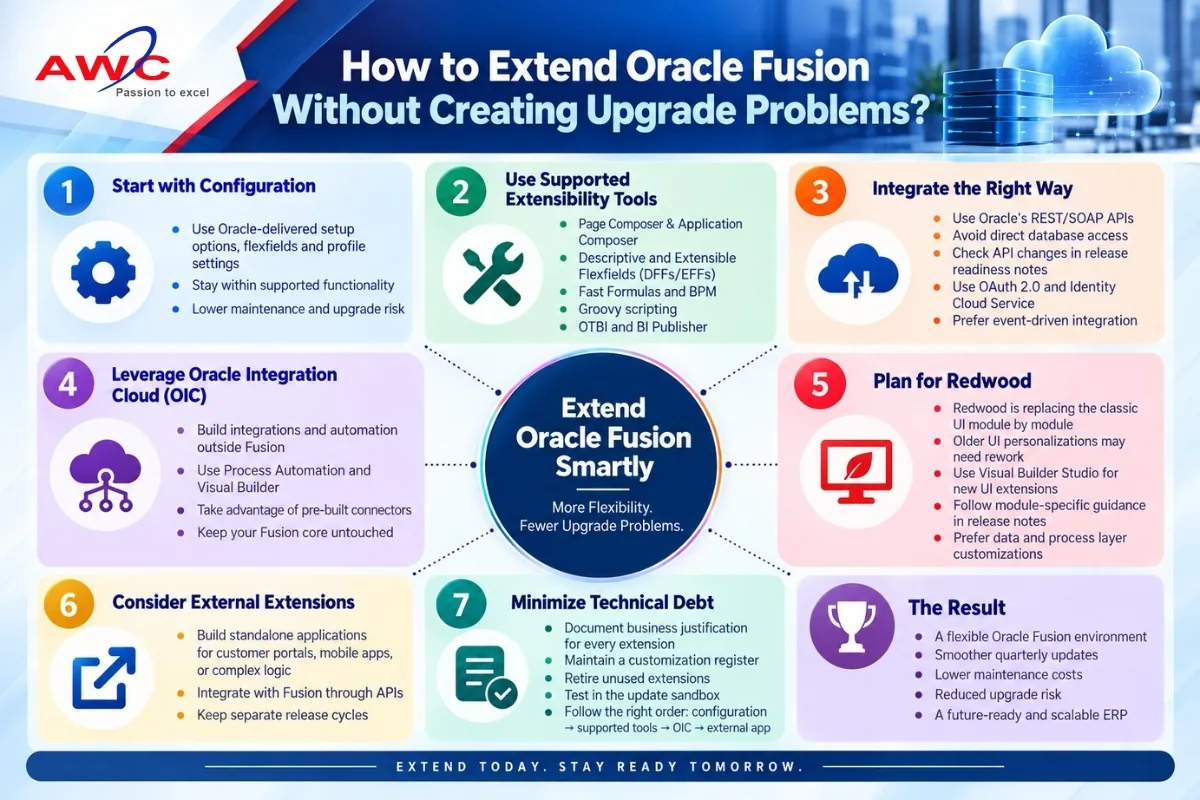
Oracle gives you several sanctioned ways to extend Fusion, all built to survive quarterly updates because Oracle itself tests against them:
- Page Composer and Application Composer. Add fields, objects, validation rules, and page layout changes inside a sandbox Oracle re-validates during upgrade testing.
- Descriptive and Extensible Flexfields (DFFs/EFFs). Add custom attributes to seeded business objects without touching the base schema.
- Fast Formulas (mostly used in HCM) and BPM task configuration for extending payroll, absence, and approval logic through Oracle's own rules engines rather than custom code.
- Groovy scripting inside Application Composer. A sandboxed scripting layer Oracle explicitly supports across upgrades.
- OTBI and BI Publisher for custom reporting, without exposing or duplicating the underlying schema.
Because all of these tools live inside Oracle's metadata layer, they carry over with regression testing in every release. That's the real difference between this list and a true customization: one is inside Oracle's field of view, the other isn't.
Using APIs the Right Way
Sometimes a requirement genuinely needs to reach outside the Fusion UI. Maybe you're integrating with a bank, a supplier portal, or an older internal system. REST and SOAP APIs are the right tool here, not a database link.
A few things worth keeping in mind when building these integrations:
- Use Oracle's published REST/SOAP web services instead of querying Fusion tables directly. Direct SQL access to Fusion schemas isn't supported, and it tends to break the moment an update touches that schema.
- Check integrations against each release's API changes. Oracle documents new and deprecated endpoints in the readiness notes for every update, so this is a five-minute check, not a research project.
- Authenticate with OAuth 2.0 and Oracle Identity Cloud Service rather than hard-coding credentials into a script somewhere.
- Where you can, use event-driven integration such as Business Events or Integration Cloud subscriptions instead of polling. It's lighter on the system and less tightly coupled to Fusion's internals.
Oracle Integration (OIC) as the Extension Backbone
A lot of requirements that feel like they need custom code inside Fusion actually belong in Oracle Integration Cloud instead. OIC gives teams a separate, independently upgraded layer to build integrations, process automation, and orchestration logic, so none of that work touches the Fusion codebase.
This matters for upgrade safety in a few concrete ways. OIC decouples your logic from Fusion entirely, so a quarterly update simply can't break it. As part of the OIC suite, both Process Automation and Visual Builder aid the teams in creating the flow of their work with workflows or miniature applications that use the APIs of Fusion instead of changing Fusion. Pre-built connectors from Oracle to systems such as SAP, Salesforce, bank infrastructure, EDI, etc., make the necessity for writing the code.
Think of OIC as your customization zone and Fusion as the core you never touch. It's one of the more effective architectural habits an enterprise can adopt.
Redwood and What It Means for Extensions
Oracle's Redwood design system is gradually replacing the classic Fusion UI, module by module, and that has real consequences for anything you've extended at the UI layer.
- Personalizations built against the old UI framework may need to be rebuilt once a module moves to Redwood, so it's worth factoring that into your extension roadmap now rather than later.
- New UI work should generally go through Visual Builder Studio rather than legacy Page Composer, since that's where Oracle's Redwood-era investment is going.
- Oracle publishes Redwood-specific extensibility guidance per module, and it's worth checking the release readiness notes before building anything new at the UI layer.
- Where possible, push customizations down to the data and process layer (flexfields, Groovy, OIC) instead of the presentation layer. UI frameworks change far more often than data models do, so this is where the extra durability lives.
External Extensions: When to Build Outside Fusion
Some things just don't belong inside Fusion at all. A customer-facing portal, a heavily branded mobile app, or a calculation engine unrelated to core ERP processes is often better off as its own standalone application that talks to Fusion through APIs. This keeps Fusion's core untouched and lets that external app move at its own pace, on its own release schedule, without waiting on Oracle's quarterly cycle.
Minimizing Technical Debt: A Practical Checklist
- Write down the business justification for every extension, along with which tool was used to build it.
- Keep a customization register and review it before each quarterly update.
- Retire flexfields, Groovy scripts, or OIC integrations once nobody's using them anymore.
- Test extensions in Oracle's update sandbox before anything touches production.
- When a new requirement comes in, work through the options in order: configuration first, then a supported extensibility tool, then OIC, and an external application only as a last resort.
This isn't a problem unique to Oracle Fusion, either. Technical debt from poorly governed customization is a well-documented risk across enterprise and government IT alike.
The Final Thoughts
None of this is complicated in theory. It's mostly a matter of discipline. Try configuration before anything else. Reach for Oracle's supported extensibility tools when configuration falls short. Push integration and custom logic into Oracle Integration Cloud instead of Fusion itself. Plan UI work with Redwood's rollout in mind. And build genuinely separate use cases as external applications rather than forcing them into Fusion. Enterprises that stick to that order end up with the flexibility they need without accumulating the kind of technical debt that turns every quarterly update into a fire drill.
Frequently Asked Questions
What's the safest way to add a custom field to a Fusion object?
Use a Descriptive Flexfield (DFF) or Extensible Flexfield (EFF) instead of altering the underlying table. Flexfields go through Oracle's own upgrade testing.
Can I still customize Fusion using PL/SQL as I did in EBS?
Not really. Fusion doesn't support direct PL/SQL modification of seeded objects. That kind of logic should go through Groovy scripting, Fast Formulas, or OIC instead.
Does every UI personalization break during a Redwood rollout?
No, not automatically, but a fair number of older Page Composer changes need rework once a module switches over. Worth checking Oracle's release readiness notes ahead of each update.
Is Oracle Integration Cloud mandatory for all integrations?
It's not mandatory, but it's the pattern Oracle recommends, mainly because it keeps custom integration logic away from the Fusion core where an update could touch it.
How often should we audit our Fusion customizations?
Before every quarterly update, ideally. A customization register makes this a lot less painful since you're not starting from scratch each time.
What's the risk of querying Fusion tables directly for reporting?
Direct schema access isn't supported. It can break without warning after an update, and it may violate Oracle's cloud service terms. OTBI, BI Publisher, or REST APIs are the safer route.
Tags: Oracle Fusion Cloud, Oracle Fusion Extensibility, Oracle Fusion Customization, Oracle Integration Cloud, OIC, Oracle ERP, Quarterly Updates, REST APIs, Technical Debt, Redwood UI